<-- this is shared/teaser/slider-teaser.html.erb -->
WorkNest - Walkthrough
WorkNest
WorkNest - Register

WorkNest - LogIn

WorkNest - Register - Login
Register and LogIn Pages
The Login and Register pages act as the secure entry point to the task management app, designed with a clean and intuitive user interface. The Login page allows existing users to quickly access their tasks with clear input validation and feedback. The Register page enables new users to create an account easily by collecting only essential information.
WorkNest - Dashboard

WorkNest - Dashboard

WorkNest - Dashboard
Dashboard Pages
Everything You Need, All in One View
- At-a-Glance Insights: Start your day with Metric Cards that summarize your progress, showing you exactly how many tasks are on your plate and what’s coming up next.
- Visual Progress Tracking: Stay motivated with Dynamic Charts that map out your productivity trends and show your task distribution in vibrant, easy-to-read visuals.
- Stay in the Loop: Never miss a beat with the Live Notifications Panel, keeping you instantly updated on every status change and new assignment.
- Smart Task Organization: Effortlessly manage your focus by switching between your personal "My Tasks" list and collaborative Group Projects, ensuring nothing falls through the cracks.
- Urgency at your Fingertips: The Upcoming Tasks widget acts as your personal assistant, highlighting your most critical deadlines so you can hit every milestone on time.
WorkNest - Tasks

WorkNest - Tasks - Create

WorkNest - Tasks
Tasks Page
The Tasks section of WorkNest is designed for ultimate control and personalization, ensuring that your to-do list is never overwhelming. With a focus on organization and quick action, you can move from "planning" to "doing" in seconds.
- Tailored Organization at Every Level
Custom Category Management: Effortlessly group your work with a dedicated categories panel, allowing you to create, edit, and color-code labels like "Home tasks" or "MMT Projects" for instant visual recognition.
- Intuitive Task Creation: Add new responsibilities quickly using a streamlined pop-up form where you can set titles, detailed descriptions, due dates, and priority levels all in one place.
- Advanced Search & Filtering: Find exactly what you need by searching for specific task names or assignees, or use the quick-filter dropdown to toggle between your personal list and team-wide assignments.
- Detailed Task Insights: Each task entry provides a comprehensive look at your work, displaying priority status, categories, and specific deadlines at a glance.
- Seamless Editing & Control: Stay flexible with easy-to-access edit and delete functions for every task and category, giving you full authority over your workspace.
- Privacy & Focus: Keep your work secure with a "Private Tasks" viewing mode, ensuring you can manage personal milestones with total peace of mind.
WorkNest - Groups

WorkNest - Groups

WorkNest - Groups

WorkNest - Groups

WorkNest - Groups

WorkNest - Groups

WorkNest - Groups
Groups Pages
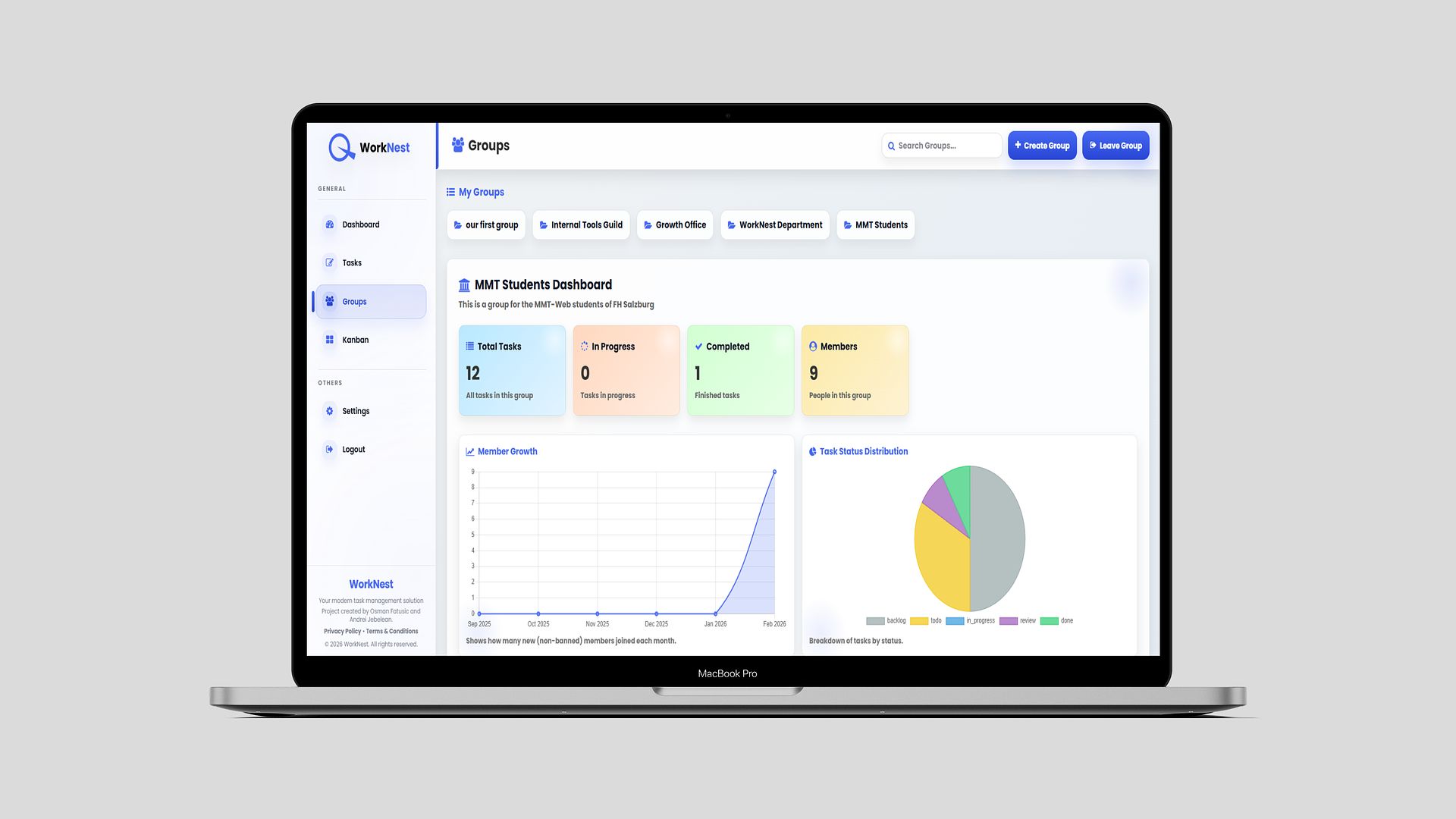
WorkNest Groups transforms individual task management into a powerful collaborative ecosystem. Designed for teams and organizations, this feature allows you to build private communities, manage member roles, and track collective success through a dedicated, data-rich group environment.
- Unified Tools for Team Success
Dedicated Group Dashboards: Each group features its own central hub, showcasing real-time metrics for total tasks, items in progress, and overall completion rates to keep everyone aligned.
- Intuitive Group Creation: Start a new collaboration in seconds with a streamlined setup process that includes custom descriptions and secure password protection for private groups.
- Visual Growth & Status Analytics: Track your team's momentum with "Member Growth" line charts and "Task Status Distribution" donut charts that provide an instant health check of your project.
- Robust Member Management: Take full control of your team with administrative tools to assign roles, update permissions, or manage group access for members like "Admins" and "Owners".
- Advanced Discovery & Joining: Effortlessly expand your network by using the group search bar to find new communities to join or manage your existing memberships with one-click "Join" and "Leave" options.
- Inspiration & Recognition: Keep the team motivated with a dedicated "Motivation" quote section and a "Top Members" leaderboard that celebrates high achievers within the group.
- Recent Activity Feed: Stay updated on the latest developments with a live log of task updates, including status changes and recent edits from all group contributors.
- High Priority Focus: A specialized "High Priority Tasks" panel ensures that the most critical team objectives are always front-and-center for every member.
WorkNest - Kanban

WorkNest - Kanban

WorkNest - Kanban
Knaban Page
The Kanban Board offers a high-energy, visual way to track your team's progress. By turning static lists into a dynamic, interactive workspace, it provides the ultimate clarity on where every task stands in real-time.
- Dynamic Workflow at Your Fingertips
Fluid Drag-and-Drop Interface: Experience effortless task management by simply dragging cards between columns to update their status instantly.
- Five-Stage Workflow Tracking: Stay organized with a clear pipeline that moves tasks from Backlog and To Do through In Progress, Review, and finally to Done.
- Comprehensive Task Cards: Get the full picture without clicking away; each card displays the task name, the assigned team member, and custom category labels for easy identification.
- Group-Specific Viewing: Easily toggle between different teams, such as the "MMT Students," to focus on the specific board that needs your attention.
- Seamless Project Transitions: Watch your productivity come to life as you move items like "Coding project" or "Test Task" through the review cycle toward completion.
- Collaborative Transparency: Instantly see who is working on what, ensuring every team member is aligned and accountabilities are clear at a glance.
WorkNest - Settings

WorkNest - Settings
Settings Page
The Settings page is your personal hub for account customization and performance tracking. It keeps you focused and secure while celebrating your progress.
- Profile Control: Quickly update your identity, change passwords, and manage your professional bio in one place.
- Lifetime Stats: View a snapshot of your impact with totals for tasks created, assigned, and completed across all projects.
- Expert Tips & Motivation: Access productivity shortcuts like Ctrl + K and stay inspired with rotating motivational quotes.