<-- this is shared/teaser/slider-teaser.html.erb -->
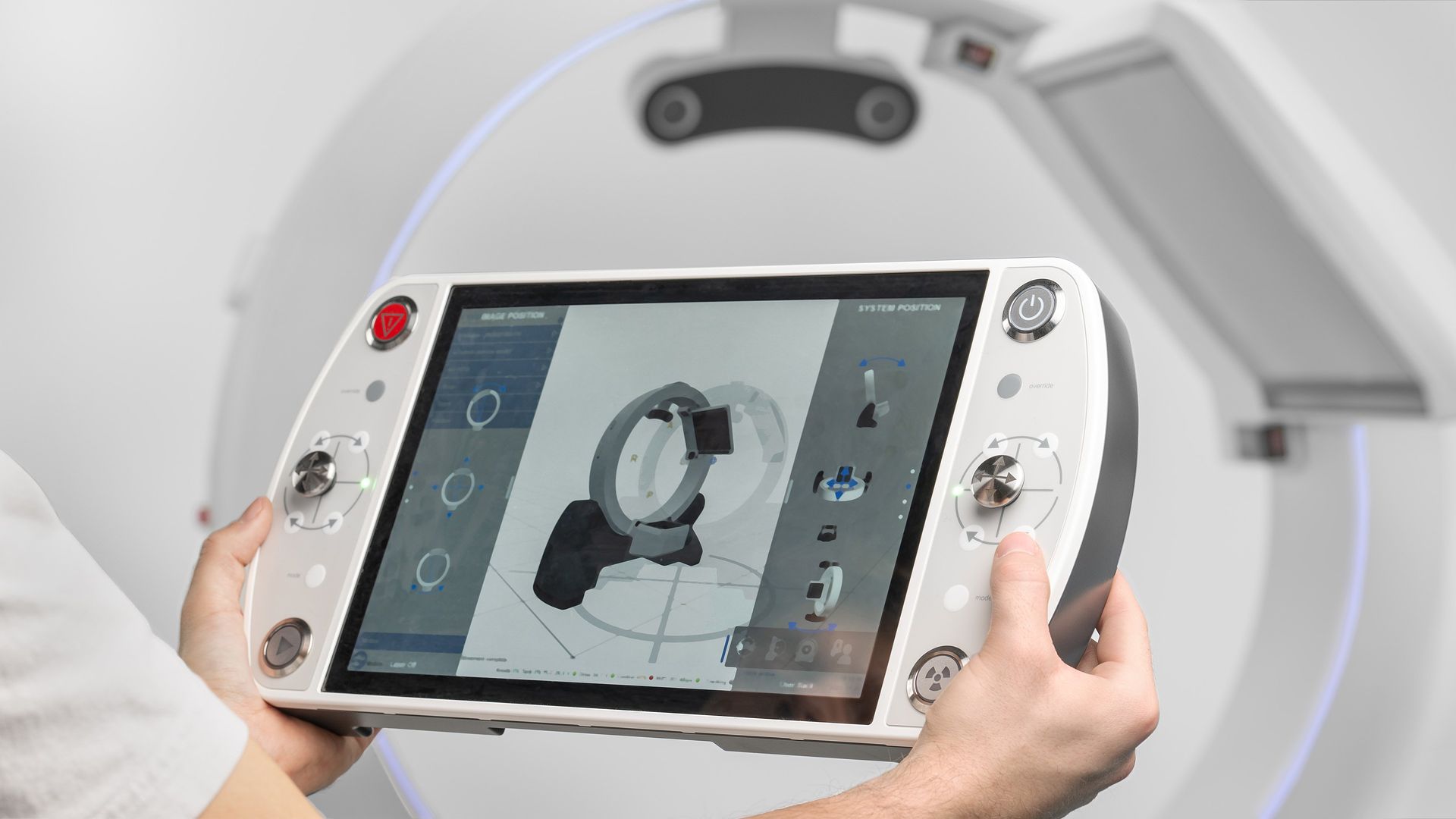
Design 1 - Grounded

Design 1 - Grounded
The Grounded Design represents a direct digital translation of the existing Remote Control Panel (RCP), preserving its spatial logic, control grouping, and interaction structure to minimize retraining and operational risk. This version was developed to provide a low-transition barrier for clinicians who use the system infrequently and rely on familiarity for safe operation.
Design 2 - Grounded one hand

Design 2 - Grounded one hand
The second Grounded Design focuses on ergonomic optimization and precision control, restructuring the interface to support safe one-handed operation while improving movement accuracy. Based on expert feedback regarding sudden motion and difficulty performing smaller adjustments. This version introduces a dedicated Precision Mode to enhance granular control.
Design 3 - Experimental

Design 3 - Experimental
The Experimental Design introduces a redesigned interaction model that aligns digital controls more closely with the physical behavior of the Loop-X system. It focuses on spatial correspondence, progressive disclosure, and configurable workflows.
This version represents the most innovative interpretation of a tablet-based controller, balancing flexibility with regulatory consistency and clinical safety.
Project Takeaway
Throughout this project we took note of various points that are worth taking into consideration or are essential for the optimisation for the redesign of the controller. Some points were applicable throughout the project while other points are highly recommended for future exploration.
We would like to emphasise the points User Testing and User Research. With small scale research and testing we were able to get a way broader insights than we could have done on our own. This is the core of a well-designed interface and, to our expertise, mandatory for the design of this controller.
Form-factors
The physical shape and size of the hardware (its form-factor) influences how an interface is designed and used. A tablet controller must balance touch areas with portability and weight to prevent user fatigue. The choice of form-factor limits the ergonomic reach of the user's thumbs and fingers, ultimately deciding whether the device can be operated safely and comfortably with for example one hand.
User Testing
User testing is eventually the process of putting prototypes in front of users to see where the design works or fails. It provides data on task completion, error rates, and satisfaction. By watching users interact with the system and listening to their feedback, designers can test the interface in a controlled environment to make sure its ready for clinical use.
User Research
User research is the foundation of any good interface, making sure how people actually interact with a product in their environment. By observing workflows and documenting interactions and frustrations, designers can identify pain points that are not obvious to a designer. This process ensures that the final design is built around the needs and behaviours of the people who will use it every day.
Accuracy
Accuracy refers to how precisely the software interprets user input and translates it into machine movement. This involves minimising delay and ensuring that touch targets are large and responsive enough to prevent accidents. Through research it came to light that there was a need for precise movement, so through implementing a layout that applies more to detailed movement, or adding a function for slowed down movement can create some trust and accuracy.
Customisability
Customisability plays into the need for inclusivity. It allows an interface to adapt to specific workflows or departmental needs. While individual users may have different preferences for where buttons are placed, the core functionality must remain consistent and predictable. Providing some extend of flexibility makes sure that the software can be used across different clinical scenarios.
Inclusivity
Inclusivity in design makes sure that a device is usable by a diverse range of people, regardless of their physical or cognitive differences. This means considering varied hand sizes, different levels of technical experience, and possible impairments like color blindness or reduced dexterity. An inclusive design results in a more flexible tool that works effectively for the entire medical team.
Haptic Feedback
Haptic feedback serves as a confirmation in digital interfaces where physical buttons are absent. By providing subtle vibrations or mechanical clicks, it gives a sensory confirmation that users feel when they interact with a device. In medical settings, this can be particularly useful for confirming that a command was registered without requiring the operator to look away from their task or the patient. We suggest exploring implementing something in the direction of a vibration motor within the connection/charging piece of the tablet.
Sound
Auditory signals serve as a second layer of communication, providing status updates or alerts. Different pitches and rhythms can be used to distinguish between an action, a system warning, or an error. When done correctly, sound reduces cognitive load by allowing the user to process information through a different channels. Before considering applying sound it would be good to check clinical environments and how adding more sound could possibly lead to over-stimulation.
Information Design
Information design focuses on clarity, hierarchy, and the reduction of clutter. Interfaces should present only the data that is essential for the current task, using grouping to guide the user’s eye to the most important information. By avoiding information overload, the design helps the user make faster, more confident decisions and reduces the chance of overlooking something or causing an error.
Within the prototype we implemented a simple “info overlay” to help guide the user in case of confusion.
Visual Feedback
Visual feedback provides a confirmation of the system’s state through either animations, color changes, or a progress bars. It connects the user’s action and the machine’s response, showing that a process is recorded or has been completed. Clear visual cues are essential for preventing users repeating commands because they weren't sure if the first one worked.